The Human Takeover Pattern: When Your AI Agent Should Shut Up
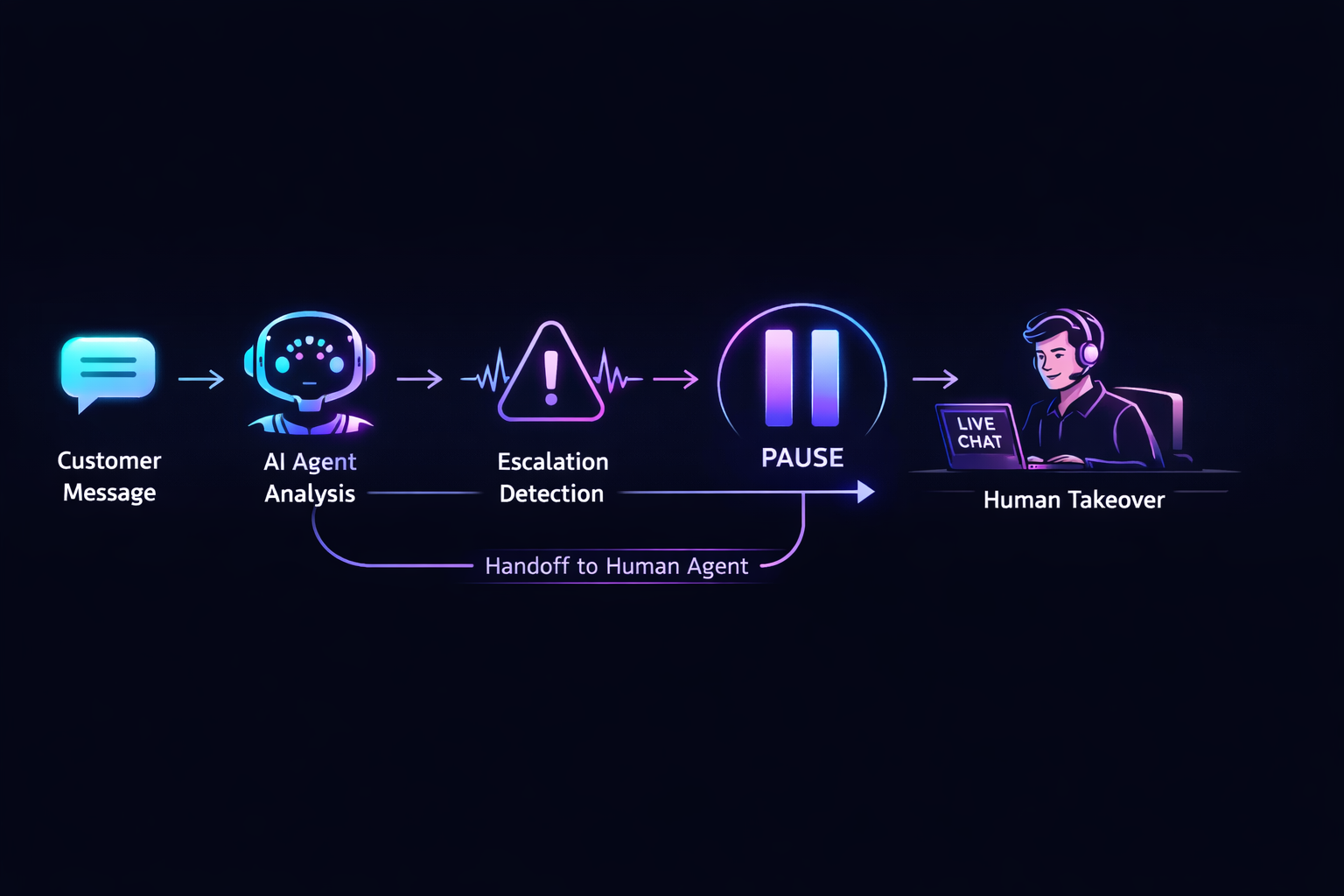
Your AI agent is great at handling "extra towels in room 312." It's less great at handling "I've been waiting 45 minutes, I'm furious, get me your manager."
Every AI messaging system needs an answer to this question: when should the bot step aside and let a human take over?
Most teams bolt this on as an afterthought. We designed it as a first-class pipeline feature. Here's the pattern.
The Problem With Always-On Agents
Without human takeover, here's what happens:
Guest:  "This is unacceptable. I want to speak to someone NOW."
Agent:  { intent: "complaint", actions: [{ type: "support.ticket.create" }] }
Guest:  "DID YOU JUST CREATE A TICKET?? I SAID A PERSON"
Agent:  { intent: "complaint", actions: [{ type: "support.ticket.create" }] }
Guest:  *leaves 1-star review*
The agent is technically correct. It classified the message, proposed an action. But it completely missed the point: the customer doesn't want an action — they want a human.
When your AI should shut up.
Sometimes the correct AI response is silence.
Agent analyzing...
I completely understand. I'm connecting you with a team member right now — someone will be with you shortly.
I'm so sorry for the wait — that's not acceptable at all. I'm escalating this to our team immediately.
Extra pillows are on their way to room 204!
{"intent": "escalation_request","confidence": 0.98,"trigger": "human_escalation_keyword","actions": [{"type": "system.conversation.pause"},{"type": "notifications.staff.alert","payload": {"reason": "Customer requested human agent","priority": "high"}}],"suggested_reply": "I completely understand. I'm connecting you with a team member right now — someone will be with you shortly.","language": "en"}
{"intent": "complaint_high_frustration","confidence": 0.95,"trigger": "negative_sentiment_threshold","sentiment_score": -0.87,"actions": [{"type": "system.conversation.pause"},{"type": "notifications.staff.alert","payload": {"reason": "High frustration detected","priority": "urgent"}}],"suggested_reply": "I'm so sorry for the wait — that's not acceptable at all. I'm escalating this to our team immediately.","language": "en"}
{"intent": "room_service","confidence": 0.94,"trigger": null,"actions": [{"type": "operations.task.create","payload": {"room": "204","request": "extra pillows","priority": "normal","department": "housekeeping"}}],"suggested_reply": "Extra pillows are on their way to room 204!","language": "en"}
Free during beta. No credit card required.
The Three Triggers
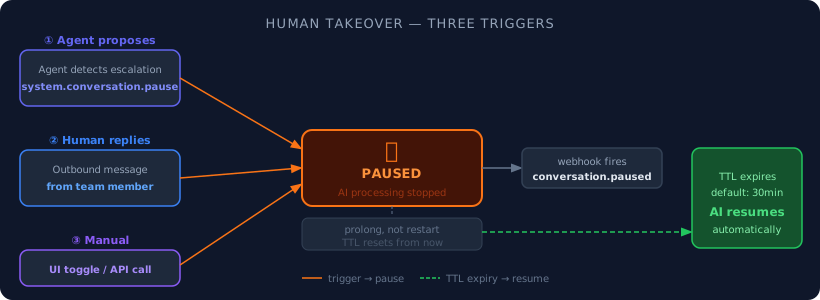
We identified three distinct ways a conversation should pause AI processing. Each has different intent, and handling them separately matters.
1. The Agent Proposes It
The agent itself can recognize when a human is needed. We don't build complex emotion detection or sentiment analysis. We just add one line to the system prompt:
If the customer needs human assistance or the conversation requires a human takeover, return a
system.conversation.pauseaction.
That's it. The LLM is surprisingly good at recognizing escalation signals — explicit requests for a person, frustration, complex multi-step situations. In our tests, it correctly proposes a pause in ~95% of escalation scenarios.
When the agent output contains this system action, we intercept it before dispatching the webhook:
- Create a conversation pause (with expiration)
- Strip all
system.*actions from the output — your backend only sees business actions, never internal system actions - Dispatch a
conversation.pausedwebhook so your CRM/helpdesk can react
2. A Human Sends a Message
When someone on your team replies to a customer through WhatsApp, the conversation should automatically pause AI processing. You don't want the bot jumping back in while a human is mid-conversation.
Every outbound message either creates a new pause or extends an existing one. This is the sneaky trigger most teams miss — if a team member replies directly from WhatsApp (not through your platform's UI), you still need to detect that outbound message and pause the AI. Otherwise the bot talks over your human. Awkward.
3. Manual Toggle
Sometimes you just want to tell the bot to shut up. A simple UI toggle. Nothing fancy.
The Key Design Decisions
Expiration, Not Permanent
Pauses auto-expire. Default 30 minutes, configurable per account.
Why? Because without expiration, one forgotten pause = one customer permanently ignored. Your team member handles the escalation, goes on lunch break, and the customer sends a new message 2 hours later. Without expiration, that message goes into the void. With expiration, the AI picks back up.
30 minutes is short enough to avoid disasters, long enough for most human interactions.
Prolong, Not Restart
When a human sends another message, we extend the pause from now — we don't restart a countdown from zero. A 10-message human conversation keeps the AI quiet the whole time. The timer only starts when the human goes silent.
Cache the Hot Path
The pause check runs on every inbound message, before any LLM call. That's a hot path. You can't afford a database query per message during a traffic spike.
We cache the active_for?(account, phone) check with a short TTL (1 minute). The DB query runs at most once per minute per conversation. Cache invalidation fires on create/update/destroy of any pause record.
Worst case: a pause created right now takes up to 1 minute to take effect for messages already in the pipeline. In practice, the cache invalidation is instant — the TTL is just a safety net.
Phone Number Normalization
WhatsApp phone numbers are... fun. The same number can show up as +33612345678, 33612345678, or with spaces. We normalize to a few common variants and check all of them. Not perfect (doesn't handle local format), but covers the 99% case from WhatsApp's API.
Where It Sits in the Pipeline
The pause check is the second thing in the routing pipeline, right after debounce:
Message received
  ↓
Debounce (batch messages)
  ↓
Human takeover check ← HERE (before any LLM call)
  ↓
PreFilter (regex, free)
  ↓
Router (LLM, classify + route)
  ↓
Per-agent filter
  ↓
Agent execution
If a human is handling it, we bail immediately. No tokens spent. No agents triggered. No webhook noise.
The Full Flow
Customer: "Get me a manager RIGHT NOW"
  ↓
Pipeline processes message normally
  ↓
Agent returns: system.conversation.pause
  ↓
System creates pause (expires in 30 min)
  ↓
Webhook: conversation.paused → Your CRM assigns to team member
  ↓
Customer: "Hello??"
  ↓
Pipeline: pause active? → YES → skip entirely
  ↓
(message goes to your team's inbox, not the AI)
  ↓
Team member replies via WhatsApp
  ↓
Outbound detected → pause extended
  ↓
... 30 minutes of silence ...
  ↓
Pause expires naturally
  ↓
Webhook: conversation.resumed
  ↓
Next customer message → AI takes over again
No manual intervention needed (unless you want it). The system smoothly transitions between AI and human, and back.
What We Learned
1. Expiration is the most important feature. We initially built pauses as permanent (resume-only). First week in testing, three conversations got stuck because someone forgot to click "resume." Never again.
2. The LLM is better at detecting escalation than you'd think. One instruction in the system prompt. No sentiment analysis library. No anger detection model. Just "if the customer needs human assistance, return this action." Works ~95% of the time.
3. Outbound detection is the feature you don't know you need. You think agent-proposed and manual toggle are enough. Then a team member replies from their phone, the bot responds 2 seconds later with a structured payload, and the customer thinks your company is insane.
4. Webhooks make it composable.
conversation.paused and conversation.resumed events let any external system react — CRM, helpdesk, Slack notification, SLA timer. The pause system doesn't need to know what your team uses. It just tells the world what happened.
This Is Built Into WhatsRB Cloud
Every agent on WhatsRB Cloud supports human takeover out of the box. Configure the pause duration, and your agents automatically know when to step aside — and when to come back.
No extra code. No Slack bot integration. Just messages in, humans or AI out, seamlessly.
Built with Ruby, Rails, and the wisdom to know when a bot should just be quiet.