Your AI Agent Doesn't Need Permission to Act — It Needs a Whitelist
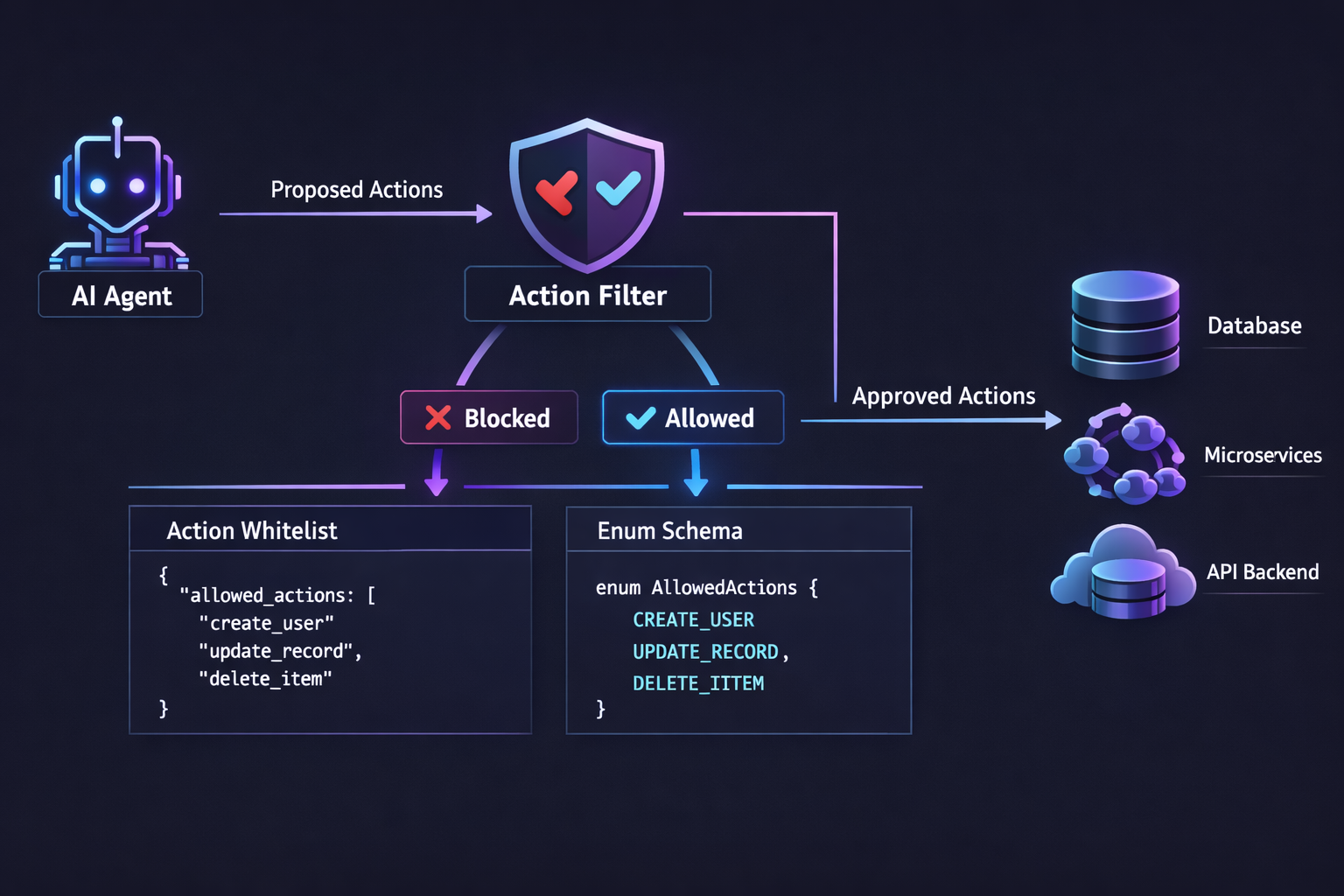
Most teams building AI agents focus on what the model should do. They write detailed system prompts, add examples, fine-tune the tone. Then they ship it and discover the real problem: what the model shouldn't do.
Your agent was supposed to classify support tickets. Instead, it returned delete.user.account because someone wrote "just delete my account already" in frustration. Your backend didn't have a handler for that. Nothing happened. But it could have.
The problem isn't the LLM. The problem is you gave it a blank canvas and hoped it would stay inside the lines.
The Blank Canvas Problem
When your AI agent can return any action type as a free-form string, you get creative outputs:
{
  "actions": [
    { "type": "process_refund", "payload": { "amount": "all" } },
    { "type": "refund-process", "payload": { "amount": 49.99 } },
    { "type": "REFUND_PROCESS", "payload": { "amt": 49.99 } }
  ]
}
Same intent. Three different formats. Your backend needs a case statement the size of a dictionary to handle every creative spelling the model invents.
And that's the benign case. The dangerous case is when the model invents an action that sounds reasonable but doesn't exist in your system. escalate_to_ceo? send_apology_email? The LLM doesn't know what your backend can actually do. It guesses.
Allow-List, Not Block-List
The fix is simple: don't tell the agent what it can't do. Tell it what it can do. Explicitly. As an enum.
Define your action types with a consistent naming convention:
domain.resource.action
Three segments. Lowercase. No ambiguity.
support.ticket.create
support.refund.process
hospitality.booking.modify
operations.shipment.track
calendar.event.reschedule
Each action type maps 1:1 to a handler in your backend. If it's not in the list, it doesn't exist. The LLM can't invent support.ticket.destroy if destroy isn't in the enum.
Why three segments? Each one serves a purpose:
| Segment | Purpose | Examples |
|---|---|---|
| Domain | Business area | support, hospitality, operations, calendar |
| Resource | What you're acting on | ticket, booking, shipment, event |
| Action | What you're doing | create, modify, cancel, track |
This gives you free filtering. Grep for support.* to see all support actions. Grep for *.*.cancel to audit every cancellation. And when you read hospitality.booking.modify in a log, you know exactly what happened without looking up a code table.
The Trick: Inject the Enum in the Tool Schema
This is where it gets elegant. Instead of telling the LLM "only use these actions" in the system prompt (which it will ignore eventually), you inject the constraint directly into the JSON schema of the tool call.
Without an allow-list, the tool schema looks like this:
{
  "name": "propose_actions",
  "parameters": {
    "properties": {
      "actions": {
        "type": "array",
        "items": {
          "properties": {
            "type": { "type": "string" },
            "payload": { "type": "object" }
          }
        }
      }
    }
  }
}
"type": "string" — the model can return literally anything.
With an allow-list:
{
  "name": "propose_actions",
  "parameters": {
    "properties": {
      "actions": {
        "type": "array",
        "items": {
          "properties": {
            "type": {
              "type": "string",
              "enum": [
                "support.ticket.create",
                "support.refund.process",
                "system.noop.skip",
                "system.conversation.pause"
              ]
            },
            "payload": { "type": "object" }
          }
        }
      }
    }
  }
}
Now the LLM is structurally constrained. It's not a suggestion in the prompt — it's a hard constraint in the schema. With structured output / tool use mode, most providers enforce enum values during token decoding — the model physically cannot output a value outside the list.
Prompt engineering says "please don't do this." Schema engineering says "you can't."
System Actions: The Escape Hatches
There's a catch. If you lock an agent to only business actions, what happens when it doesn't know what to do? Or when the customer asks something completely off-topic?
The answer: system actions. These are always available, regardless of what the user configures.
system.noop.skip          → "Nothing to do here"
system.conversation.pause → "A human should handle this"
Noop means the agent analyzed the message and decided no action is needed. A thumbs-up emoji, a "thanks", a message clearly meant for someone else. Without noop, the agent is forced to pick something from the list, even when nothing applies. That's how you get phantom tickets.
Pause means the agent recognizes it's out of its depth. Instead of hallucinating an answer, it flags the conversation for human review. The agent steps back, a human steps in.
These two actions close the gap. Every message has a valid path:
- Maps to a business action → handle it
- Requires no action → noop
- Needs a human → pause
The agent is never stuck. It always has a way out.
Your AI doesn't need permission to act.
If your agent has 50 actions, it will hallucinate.
Agent analyzing...
I'm not able to arrange taxis directly, but our front desk would be happy to help! You can reach them at extension 0.
Your burger and fries are on their way! Estimated delivery: 20–25 minutes.
I'm sorry to hear that. Refund requests need to be handled by our team — I'm connecting you with a manager now.
{"intent": "taxi_booking","confidence": 0.93,"whitelist_check": "failed — taxi_booking not in allowed actions","actions": [{"type": "system.noop.skip"}],"suggested_reply": "I'm not able to arrange taxis directly, but our front desk would be happy to help! You can reach them at extension 0.","language": "en"}
{"intent": "room_service_food","confidence": 0.97,"whitelist_check": "passed","actions": [{"type": "operations.task.create","payload": {"category": "room_service","items": ["burger","fries"],"priority": "normal"}}],"suggested_reply": "Your burger and fries are on their way! Estimated delivery: 20–25 minutes.","language": "en"}
{"intent": "refund_request","confidence": 0.91,"whitelist_check": "failed — refund.issue requires human approval","actions": [{"type": "system.conversation.pause"},{"type": "notifications.staff.alert","payload": {"reason": "Refund request — human review required","priority": "high"}}],"suggested_reply": "I'm sorry to hear that. Refund requests need to be handled by our team — I'm connecting you with a manager now.","language": "en"}
Free during beta. No credit card required.
What Your Backend Receives
Here's the beautiful part. After the LLM responds, system actions are stripped before the webhook fires. Your backend only sees business actions:
{
  "event": "agent_run.completed",
  "data": {
    "intent": "refund_request",
    "confidence": 0.95,
    "actions": [
      {
        "type": "support.refund.process",
        "payload": { "order_id": "ORD-7742", "reason": "damaged_item" }
      }
    ]
  }
}
Your handler is a clean switch:
case action["type"]
when "support.ticket.create"    then create_ticket(payload)
when "support.refund.process"   then process_refund(payload)
when "support.escalation.request" then escalate(payload)
end
No fuzzy matching. No "did the model mean refund or reimburse?" No defensive parsing. If the action is in the webhook, it's valid and your backend knows exactly what to do with it.
The "But What If" Objections
"What if I need a new action type?"
Add it to the allow-list. It takes 10 seconds. Then add the handler in your backend. The agent will start using it on the next run.
"What if the agent picks the wrong action?"
It can. But at least it picks a valid wrong action. support.ticket.create when it should have been support.refund.process is a routing error you can detect and fix. reimburse_customer_plz is chaos.
"What if I don't know my action types yet?"
Leave the allow-list empty. The agent falls back to free-form strings. Start there, read the webhook logs for a week, and you'll see the natural taxonomy emerge. Then lock it down.
"10 actions feels limiting."
10 keeps the schema tight and the agent focused. If your agent needs more than 10 action types, you don't need a bigger list — you need more agents. A support agent, a scheduling agent, a logistics agent. Each with their own focused allow-list.
No prompt hacking. No "I hope the model follows instructions." A structural constraint that makes invalid actions impossible.
Your AI agent doesn't need more guardrails. It needs a shorter leash.
What's next? We're exploring a third system action: system.clarification.request — when the agent needs more context before deciding. Stay tuned.
We built this action whitelist pattern into WhatsRB Cloud so every agent runs with a clear, bounded set of capabilities. If you're building AI workflows on WhatsApp, check it out — the allow-list is configured per agent in about 30 seconds. Full guide: Allowed Actions documentation.